What if paste knew what the field wanted?
Cue: a Mac clipboard that pastes only the part a field wants
- Runs on
- macOS 15 or later
- First released
- Updated
Cue is a macOS menu-bar clipboard that reads the field you're about to paste into and pastes only the part of your clipboard that fits. Copy a chat message, focus the To field of an email, and Cue pastes just the address. It's for people who copy a block of text and paste pieces of it into forms all day.
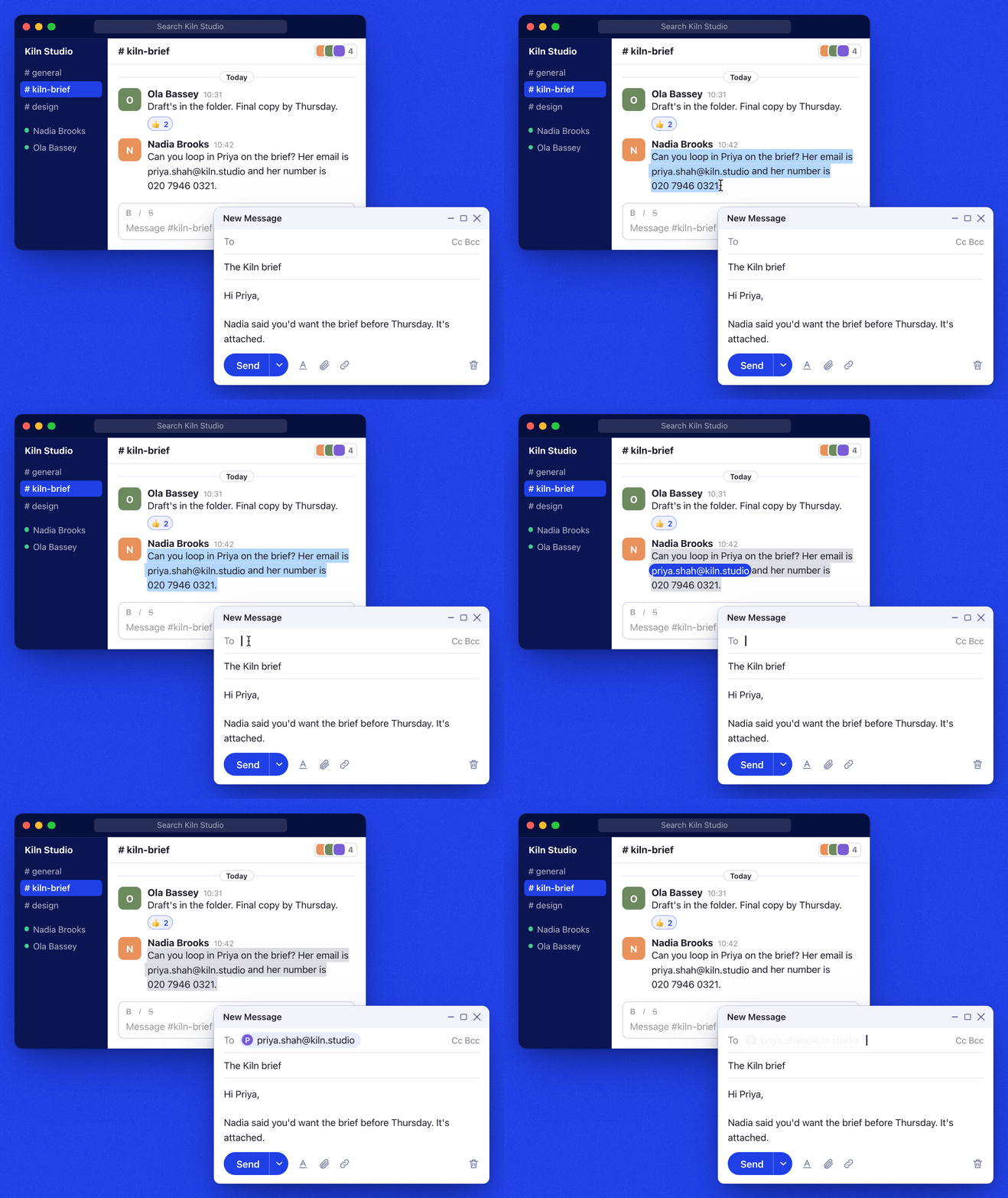
I rebuilt Cue as a real background app from a demo @marcus_lowe posted on X. The first commit is dated 2026-09-20, under the name SmartCopyPaste, and I renamed it Cue the next day.
The model picks, and never writes
Cue reads the focused field through the macOS Accessibility API, builds candidate pastes from your clipboard history, and asks a model to choose one. The model can't write text. It can only choose among clips you copied.
The reader (ContextCaptor in Sources/CueKit/Context.swift) captures the frontmost app, the window title, and the focused element's role, label, placeholder, nearby text and web host. Each Accessibility message is capped at 50 ms. Chromium and Electron apps hide their pages from Accessibility, so Cue sets AXManualAccessibility when one becomes active. Without it, a browser field has no label.
The options come from your last 20 clips and your pins, capped at 20. Each clip gives its whole text plus every email, phone number, URL and code span found inside it, so "just the email" is one option among the others. The model returns a probability for each option in one forward pass. Cue pastes at once when the leading option clears a confidence threshold and a margin over the runner-up. Otherwise it shows a chooser at the caret with up to nine ranked rows. Keys 1 to 9 or Return pick a row, and Esc pastes plain text.
Some cases never reach the model. A field of a clear type (email, phone or URL) with exactly one matching clip pastes with no model call. Cmd+V skips the model if the latest clip fits. Password fields get a plain paste, and Cue never reads their value. Every failure ends in a plain paste, and a dead model gives a chooser of recent history.
Cue can run the model on your Mac. It installs uv and a model (0.7 to 4 GB of memory) and prefetches the answer when you switch apps or copy. Remote providers see clip text only after an on-device CoreML model (about 12 MB) redacts it. If the redaction fails, nothing is sent.
110 test cases, 89% resolved with the default model
I built CueEval for this: 110 synthetic cases run through the real decision engine on Apple Silicon. A case is "resolved" if the paste is exactly right or the right answer shows in the chooser. It's "wrong" if Cue pastes the wrong thing with confidence, or shows a popup when plain paste was right. Run-to-run spread is about 4 points on resolved and 2 on wrong. Each row is one run, not re-run for this page.
| Local model | Resolved | Wrong | p95 latency | Memory |
|---|---|---|---|---|
| Decider 0.8B | 92% | 1% | 249 ms | 3.0 GB |
| Kev 0.8B | 90% | 5% | 249 ms | 4.0 GB |
| JevK5-Lite (default) | 89% | 4% | 353 ms | 0.7 GB |
| system-one Qwen3 0.6B | 83% | 4% | 199 ms | 2.7 GB |
On 2026-10-19 I also drove real Chrome, Safari, TextEdit and Terminal with real keystrokes. A recruiter's day of 45 steps went 43 correct, 1 trimmed and 1 wrong or missed. An engineer's day of 44 steps went 42 correct and 2 wrong or missed. The hotkey wait had a p50 of 107 to 116 ms.
What Cue gets wrong
- Cue needs Accessibility permission, and a field that doesn't expose itself to Accessibility doesn't work.
- The chooser appears too often with the 0.8B models. My target was a chooser on at most 20% of unambiguous cases, and an earlier summary missed it at 45%, 50% and 78% for three models. My progress notes put the Decider 0.8B at 17 to 20%.
- History is stored as plain JSON, not encrypted, though Cue never records concealed or transient clipboard types.
- Smart paste writes plain text. An earlier review found it lost RTF, HTML and image formats and left the clipboard changed. Later fixes may have changed that, and I haven't re-checked.
- I have no data from real users, and I didn't benchmark the hosted model option.
Against Maccy, Paste, Raycast and Alfred
Maccy, Paste, Raycast Clipboard History, Alfred's clipboard and the Spotlight clipboard history in macOS 26 all show your history and let you pick. Cue picks for you, can paste one span of a clip, and falls back to a short list when it's unsure.
Those tools are more mature: Paste syncs between devices, and Raycast keeps rich formats. I haven't timed Cue against manual picking, so I make no speed claim.
Try Cue
Download Cue.dmg, drag Cue to Applications, open it, grant Accessibility and pick a model in onboarding. It needs macOS 15 or later, and the README says the DMG is signed and notarized. Smart paste is Ctrl+Opt+V and plain paste is Ctrl+Opt+Shift+V.
To build from source, use Xcode 26 and Scripts/bundle.sh. The README says Apache 2.0, but the LICENSE file isn't committed yet. Site: cue.hridya.tech. Source: github.com/hridaya423/cue.