What if a circuit board could cut its own launch film?
silk reel: one command turns a KiCad board into a 12-second film
- Runs on
- Node 22 or later with ffmpeg, or a web browser
- First released
- Updated
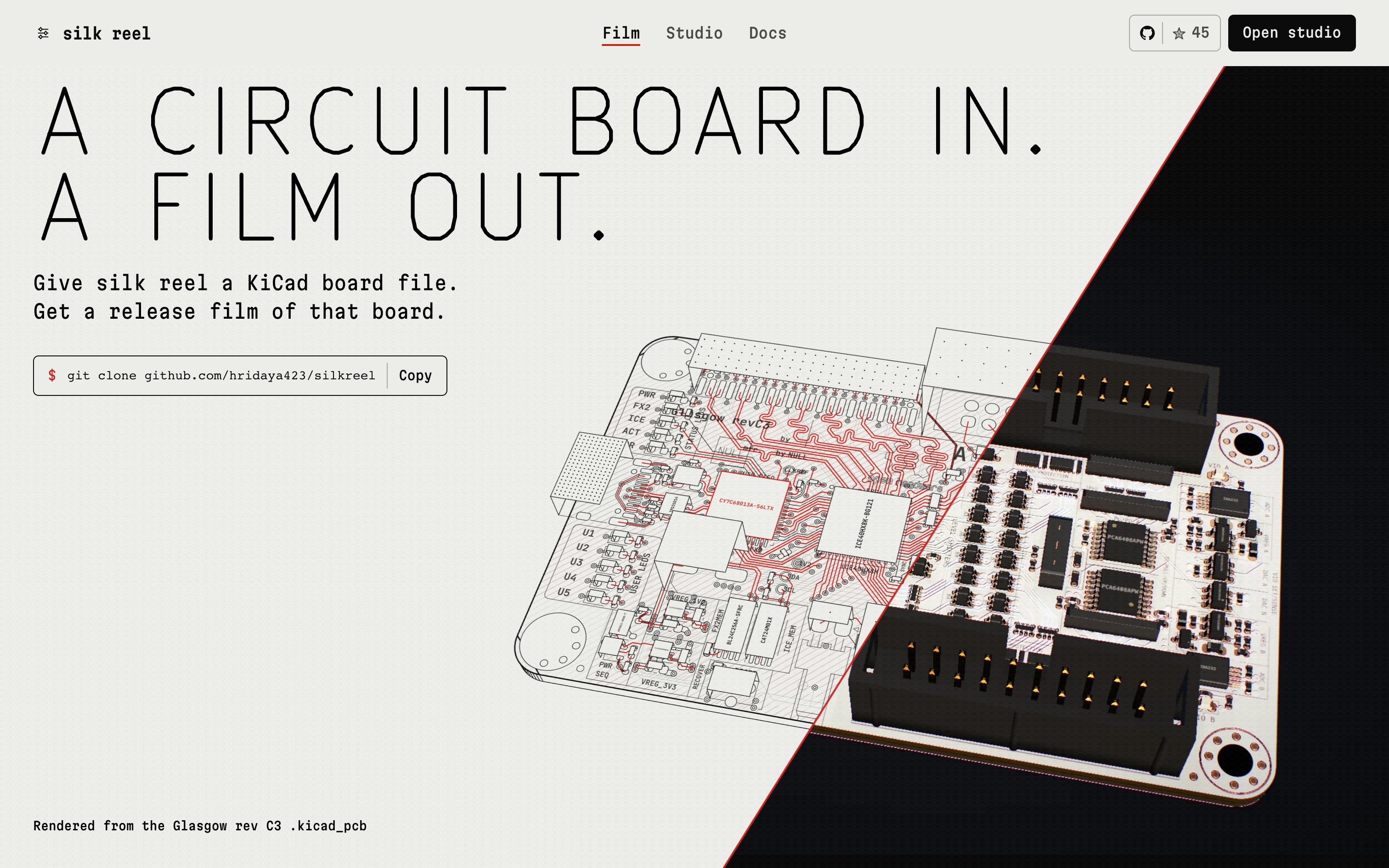
silk reel turns a KiCad .kicad_pcb file into a 12-second film built from the board's real copper, parts and silkscreen. It's for hardware makers who have finished a board and need a video for the launch post, with no animation skills. The same board and flags always give the same film.
From S-expressions to a timeline
silk reel doesn't animate a picture of your board. It reads the board, works out what each part of it is, and compiles a timeline from that.
- Parse.
parseKicadPcb()inpackages/ingestreads the file (KiCad 4 and later) into a model of the outline, copper per layer, footprints and silkscreen. In the browser studio this runs in a worker, so the board never leaves your computer. - Pick a hero part. The default is the IC with the most pads. If it sits on the back copper, the whole film flips to the back side.
- Classify nets.
netKind()sorts nets by name into ground, power, clock, differential pair, bus and signal. A net's role decides when it lights up after power-on. - Compile. The trace film is one arc on a 24-beat grid. It draws the copper (beats 0 to 5.5), places the parts (10 to 13.5) and powers on (16 to 22), with four camera shots cutting at beats 10, 15 and 20.
- Load real part bodies. silk reel reads the STEP model paths from the board as KiCad does and tessellates them with occt-import-js. A model must cover 75% of the part's pads. Otherwise the part keeps an estimated body.
- Render and encode. A lit WebGL2 plate on a studio floor, with instanced part meshes, depth of field, bloom and motion blur. Remotion and ffmpeg write the file, with bundled CC0 sound placed on score events and mastered to -14 LUFS.
Two other looks, glyph and plot, draw on Canvas2D. Pick one with --style trace|glyph|plot. Output is MP4, GIF, WebM with alpha or ProRes 4444 with alpha.
What a render costs
A trace render takes about 30 seconds on my Apple M4 Pro and produces a file near 8 MB. Both figures come from the README, and I haven't re-measured them. The format sizes below come from scripts/films.sh, also not re-measured.
| Format, one 11.2 s glyph film, 16:9 | Size |
|---|---|
| MP4 | 2.4 MB |
| GIF (720x405) | 88 KB |
| WebM with alpha | 163 KB |
| ProRes 4444 | 38.6 MB |
What silk reel can't do yet
- It reads KiCad 4 and later only, not Gerber, Eagle or Altium files.
- The browser studio previews and records WebM only, and shows estimated part bodies. Other formats and real STEP models need the CLI, which needs Node 22 or later with
ffmpegandffprobeon the path. - The trace look is heavy on the GPU. Without one, set
SILK_REEL_GL=swangle. On my machine, high concurrency crashed the renderer. - My own notes from 20 October say the trace look still looks weak to me.
- Tests don't check visual quality. I review the films by eye.
Against KiCad's 3D viewer and Blender
KiCad's built-in 3D viewer is free and exact. It orbits a board and renders ray-traced stills, but it has no authored camera, timeline or sound, so a video means screen recording or scripting.
A manual Blender pipeline gives more control and a higher quality ceiling. You export STEP or VRML from KiCad, then light, animate and render the scene yourself. Stills from KiCad cut together in a video editor work too. silk reel wins only on effort: one command, and a film you can post.
Try silk reel
In the browser, open silkreel.hridya.tech/studio. The tab reads your board file and doesn't upload it. It records WebM, saves stills and writes the matching CLI command.
Locally, with Node 22 or later and ffmpeg:
git clone https://github.com/hridaya423/silkreel && cd silkreel && npm ci
npm run reel -- path/to/your-board.kicad_pcb --title "Your Board" --version v1.0
The first render downloads headless Chrome, about 90 MB. Other flags include --aspect 4:5|1:1|9:16|16:9, --format mp4|gif|webm-alpha|prores-alpha and --hero U3. Source: github.com/hridaya423/silkreel (Apache-2.0).